
Advanced settings reference
Advanced edits Agent configuration on the server host. It controls DayZ startup and shutdown, assigned ports, handling of mods, backups and logs, and the actions surrounding updates and wipes.
For DayZ gameplay values and serverDZ.cfg, open Config. Reserve Advanced for host-level behavior.
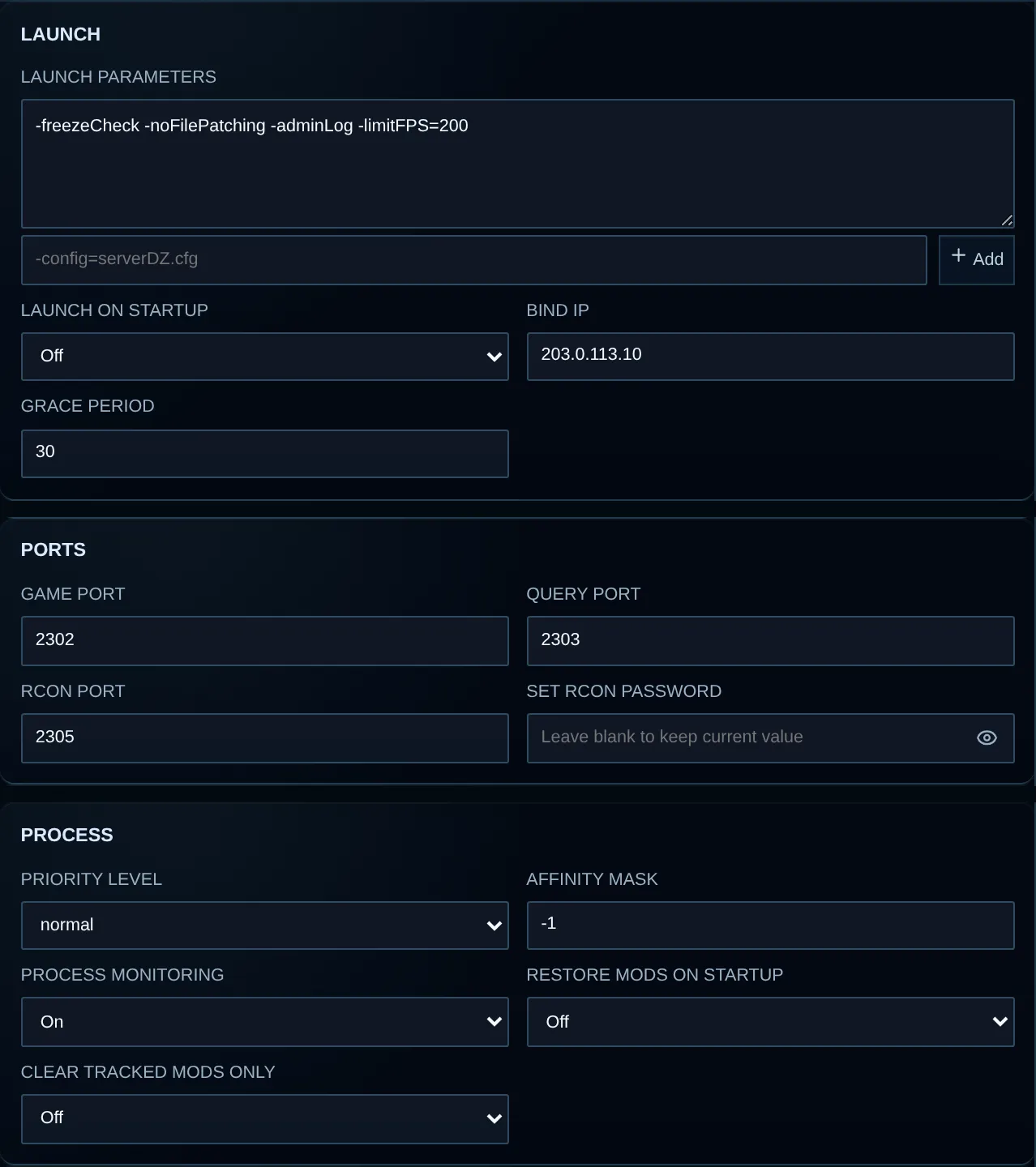
These settings affect how the host runs your server. Password fields accept replacements without showing saved values, and provider-protected settings may be locked.
Save an advanced change
Section titled “Save an advanced change”- Go to Configuration and choose Advanced.
- Press Refresh and wait until the form reads
Synced. - Edit the fields needed for the task you are working on.
- Check the notification timelines and any validation warnings.
- Press Save and wait for
Syncedagain. - Use Console to restart if the change affects startup or the running process.
- After restarting, inspect Console, Network and DayZ logs.
Revert drops the unsaved draft. A write-only secret field does not display its stored value. Read its guidance before saving and enter a replacement only when you intend to rotate the secret.
Your service policy can hide fields or make them read-only. Locked launch parameters are provider-protected and cannot be edited or removed in a customer session.
Launch
Section titled “Launch”| Setting | Configuration path | Meaning |
|---|---|---|
| Launch parameters | launch_params |
Editable DayZ arguments, for example -dologs or -config=serverDZ.cfg. Preserve each argument and use the input format shown. Provider-protected arguments stay locked. |
| Launch on startup | launch_on_startup |
Runs the game when the Agent/service host starts. Disable it if maintenance requires the game to stay stopped following a host restart. |
| Bind IP | ip |
The address used by the game process. Provider-managed wildcards may be required; selecting an unassigned address can block startup. |
| Grace period | grace_period |
The Agent lifecycle uses this numeric grace value. Its unit is not labeled in the current panel. Keep the provider value unless support specifies a replacement. |
Frequently used launch arguments include:
| Parameter | Purpose |
|---|---|
-config=serverDZ.cfg |
Chooses which DayZ server configuration file to read. |
-profiles=profiles |
Sets the directory for profiles, RPT and other logs. |
-dologs |
Turns on broad RPT logging. |
-adminlog |
Turns on the DayZ admin log. |
-freezecheck |
Activates DayZ freeze detection and dump handling. |
Use Mods to manage -mod and -serverMod when that page controls the lists. Adding them by hand as well creates two sources of load order and makes problems harder to trace.
Ports and RCON
Section titled “Ports and RCON”| Setting | Configuration path | Meaning |
|---|---|---|
| Game port | ports.game |
The main UDP port carrying DayZ gameplay. |
| Query port | ports.query |
Launchers and server browsers use this Steam/A2S port. |
| RCon port | ports.rcon |
The port for RCON clients and the panel RCON connection. |
| Set RCon password | rcon_password |
Sets a replacement RCON password. Enter a unique, high-entropy value when rotating the secret. |
Port syntax accepts 1–65535, but use the ports assigned to you. A valid number can still be unreachable without an assignment. Read Server address and ports and ask support before changing a port.
Process
Section titled “Process”| Setting | Configuration path | Meaning |
|---|---|---|
| Priority level | priority_level |
Sets Windows scheduling priority for DayZ. The available levels are listed below. |
| Affinity mask | affinity_mask |
A numeric bitmask selecting the logical processors available to the game. A wrong mask can reduce performance or leave no usable assignment. |
| Process monitoring | process_monitoring |
Turns on Agent monitoring of the game process. Retain the provider default except when working with support on lifecycle diagnostics. |
| Restore mods on startup | restore_mods_on_startup |
Makes the Agent restore or prepare tracked mod files during startup. It may extend startup time while keeping the working mod set consistent. |
| Clear tracked mods only | clear_only_tracked_mods |
Limits the relevant mod-cleanup actions to Agent-tracked folders, helping preserve unrelated custom folders. Back up before changing cleanup rules. |
Priority level options
Section titled “Priority level options”| Value | Effect | Guidance |
|---|---|---|
Idle |
Executes when higher-priority work leaves time. | Unsuitable for routine game hosting. |
Below Normal |
Runs below ordinary application priority. | Reserve for test workloads you intend to deprioritize. |
Normal |
Uses the standard Windows process class. | The recommended default. |
Above Normal |
Takes scheduling preference over normal tasks. | Use when the provider assigns it. |
High |
Strong preference can starve other host processes. | Get support guidance before selecting it. |
Realtime |
The highest class can leave the OS or management services unresponsive. | Do not use for routine game hosting. |
Backups
Section titled “Backups”| Setting | Configuration path | Meaning |
|---|---|---|
| Backups enabled | backups.enabled |
Activates the server’s Agent backup configuration. |
| Backup at startup | backups.at_startup |
Requests a backup as part of startup, which can extend the time needed to start. |
| Interval | backups.interval |
The Agent uses this number as the automatic-backup interval. No unit is shown in the current panel; retain the provider value unless support defines another. |
| Max keep time | backups.maximum_keep_time |
The Agent uses this numeric retention limit. Its unit is not shown, so do not assume the number denotes days or hours. |
| Backup file list | backups.filelist |
Lists one relative file or directory on each line. Backups contain listed data only. |
The Backups page and Create backup require a file list. Include the configuration, mission, profile and persistence paths needed for recovery. Exclude disposable cache/download data that you can recreate.
Log storage
Section titled “Log storage”| Setting | Configuration path | Meaning |
|---|---|---|
| Log storage | log_storage.enabled |
Activates the Agent’s stored-log collection and retention. |
| Maximum keep | log_storage.maximum_keep |
The Agent’s numeric retention setting. Keep the assigned value because the panel does not specify its unit. |
| Paths | log_storage.paths |
Lists one source path per line for Agent log handling. |
| Patterns | log_storage.patterns |
Lists one file-matching pattern per line within the configured paths. |
Stored logs and the live Console buffer in your browser are separate. An incorrect path or pattern can leave Logs empty while the server continues running.
Updates
Section titled “Updates”| Setting | Configuration path | Meaning |
|---|---|---|
| Shutdown on game update | shutdown_title_update |
Allows the Agent to stop DayZ when its tracked title-update workflow needs a shutdown. |
| Shutdown on mod update | shutdown_mod_update |
Allows a server stop when a tracked Workshop update requires refreshed files. |
| Ignore server-side mods | shutdown_mod_update_ignore_serverside |
Removes server-side-only mod changes from update-triggered shutdown. Enable only when those mods can be refreshed safely without that handling. |
| Priority server | priorityServer |
Identifies the provider/Agent priority service. Change it only to an exact value supplied by support. |
| Set priority API key | priorityApiKey |
Rotates the priority service’s write-only credential. Enter a value when replacing it, and keep it out of tickets and screenshots. |
Set up player notifications and plan how you’ll restart the server after an update-triggered shutdown. Keep the game stopped while changing files it uses; disabling automatic shutdown does not make those changes safe.
Notifications
Section titled “Notifications”Notifications have three independent workflows:
- Shutdown Notification runs ahead of planned shutdown.
- Game Update Notification accompanies maintenance caused by a tracked game update.
- Mod Update Notification accompanies maintenance caused by tracked Workshop updates.
When you enable a workflow with missing values, it fills in a 120-second duration, 5-second interval and 60-second action timer. Check these starting values before saving.
Enabled workflows display an Execution timeline. Duration marks the stop time; kick and lock timers count forward from the start of the countdown, not back from shutdown.
Fields repeated for each workflow
Section titled “Fields repeated for each workflow”| Setting | Paths | Meaning |
|---|---|---|
| Message | notifications.shutdown.message, notifications.update_game.message, notifications.update_mod.message |
The countdown broadcast text. {{countdown}} inserts the remaining value; {{delta}} inserts the elapsed/change value provided by the Agent. |
| Duration (seconds) | notifications.shutdown.timer, notifications.update_game.timer, notifications.update_mod.timer |
Sets the total countdown duration. A positive value enables the workflow. |
| Interval (seconds) | notifications.shutdown.interval, notifications.update_game.interval, notifications.update_mod.interval |
Sets the delay between countdown broadcasts. Very short delays can flood player messages. |
| Kick on countdown | notifications.shutdown.kick.engage, notifications.update_game.kick.engage, notifications.update_mod.kick.engage |
Enables player kicks during this countdown. |
| Kick timer (seconds) | notifications.shutdown.kick.timer, notifications.update_game.kick.timer, notifications.update_mod.kick.timer |
Schedules kicks this many seconds after countdown start. Keep the value at or below Duration. |
| Kick message | notifications.shutdown.kick.message, notifications.update_game.kick.message, notifications.update_mod.kick.message |
The message displayed to kicked players, with support for {{countdown}} and {{delta}}. |
| Lock server on countdown | notifications.shutdown.lock.engage, notifications.update_game.lock.engage, notifications.update_mod.lock.engage |
Prevents new players from joining during the countdown. |
| Lock timer (seconds) | notifications.shutdown.lock.timer, notifications.update_game.lock.timer, notifications.update_mod.lock.timer |
Applies the lock this many seconds after countdown start. Keep the value at or below Duration. |
Notification example
Section titled “Notification example”A two-minute maintenance countdown can use:
| Field | Example |
|---|---|
| Duration | 120 seconds |
| Interval | 30 seconds |
| Lock timer | 30 seconds from start |
| Kick timer | 90 seconds from start |
| Stop | 120 seconds from start |
This example sends a warning at the start, locks at 30 seconds, kicks at 90 seconds and stops at 120 seconds. The timeline flags actions placed after that stop point.
Health
Section titled “Health”| Setting | Configuration path | Meaning |
|---|---|---|
| Lifeness probe | lifeness_probe.enabled |
Enables the Agent liveness check. Its configuration retains the existing lifeness spelling. |
| Probe interval | lifeness_probe.interval |
Sets the numeric delay/frequency for probes. The panel does not show a unit; retain the provider default. |
| Max failures | lifeness_probe.max_failures |
The tolerated count before failed probes trigger the Agent’s monitoring policy. A low setting can react to brief stalls. |
| Reset failures | lifeness_probe.reset_failures |
Determines whether accumulated failures reset under the Agent’s liveness behavior. Keep the assigned value unless support directs troubleshooting changes. |
Check player joins and Steam-query visibility separately from Agent liveness. Use Console status, Network and logs together to investigate a connection or listing problem.
Features
Section titled “Features”Queue grace
Section titled “Queue grace”| Setting | Configuration path | Meaning |
|---|---|---|
| Queue grace | features.queue_grace_dz.enabled |
Activates DayZ reconnect queue-grace handling for eligible players. |
| Queue removal seconds | features.queue_grace_dz.removal |
Sets how long the Agent retains a queue-grace record. |
| On disconnect | features.queue_grace_dz.on_disconnect |
Applies queue grace after normal or unexpected player disconnections. |
| On kick | features.queue_grace_dz.on_kick |
Applies grace after a kick. Disable when kicked players should lose that benefit. |
Queue grace changes reconnect order without changing authentication or whitelist checks.
Storage wipe
Section titled “Storage wipe”| Setting | Configuration path | Meaning |
|---|---|---|
| Storage wipe | features.storage_wipe.enabled |
Allows the stored wipe schedule to execute. |
| Wipe schedule | features.storage_wipe.schedule |
Stores a recurring expression or one-time date/time, interpreted according to wipe mode. |
| Stop before wipe | features.storage_wipe.preprocessing.stop_server |
Stops DayZ before storage changes. Leave enabled to preserve data consistency. |
| Backup before wipe | features.storage_wipe.preprocessing.create_backup |
Requests a recovery copy before deletion and requires a valid backup file list. |
| Start after wipe | features.storage_wipe.postprocessing.start_server |
Starts DayZ when the wipe workflow has finished. |
| Disable after wipe | features.storage_wipe.postprocessing.disable_after_wipe |
Disables this wipe configuration after execution to prevent another run. |
Configure wipes through the Restart and wipe schedules guide instead of editing this stored string. That workflow includes wipe mode, DayZ wipe type, local-time conversion and required confirmation of the destructive action.
Recommended defaults and escalation
Section titled “Recommended defaults and escalation”- Leave provider-protected launch arguments intact.
- Keep
Normalpriority unless your provider assigns another level. - Retain the assigned ports and bind IP.
- Verify the backup list, then leave Stop before wipe and Backup before wipe enabled.
- Space notification messages so players receive useful notice without repeated broadcasts every few seconds.
- Ask support for the unit and expected range before changing a value whose unit is not labeled.
Do not work around an unavailable setting through raw files or unrelated launch arguments. Ask VYKIX on Discord, giving the external server ID, field name, current non-secret value and the result you need.