
Webhooks and Discord notifications
Select your server and open Webhooks to send Discord notices when it starts, stops or finishes a game or mod update. Each destination has a channel URL, selected events, templates and a delivery switch. Customers can create up to five destinations per server and manage their own destinations on servers they can access.
Start with built-in presets or open Advanced: Customize payload to edit an event’s wording, branding or embed fields. Configure in-game countdowns through the separate Configuration → Advanced controls.
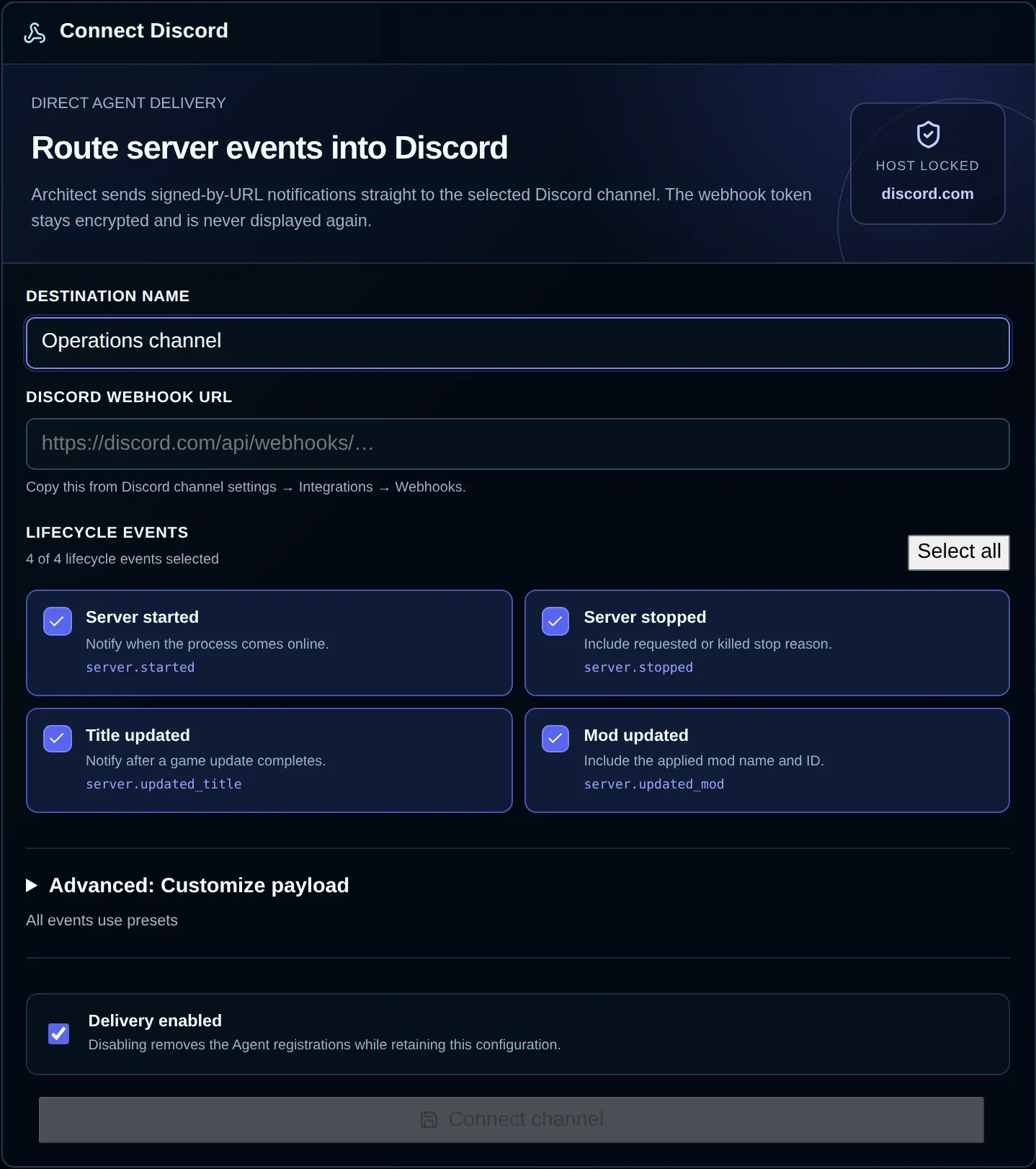
This example has not been saved. Its empty URL field means no Discord channel was connected for the screenshot.
Connect a Discord channel
Section titled “Connect a Discord channel”- Open the intended Discord channel’s Integrations → Webhooks settings and copy its webhook URL. You must have permission to manage that channel’s webhooks.
- In the panel, go to Webhooks and press New under Discord destinations.
- Give it a recognizable Destination name of no more than 80 characters.
- Enter the Discord webhook URL. Supported URLs use
https://discord.com; custom hosts and other services are rejected. - Choose one or more Lifecycle event options, or use Select all.
- Leave Delivery enabled selected to receive notifications.
- Press Connect channel and wait for
activestatus. - Press Test to send a connection-test message to the saved channel.
Choose lifecycle events
Section titled “Choose lifecycle events”| Panel label | Event | Notification |
|---|---|---|
| Server started | server.started |
The game process has come online. |
| Server stopped | server.stopped |
The process has stopped; the message includes its reported reason. |
| Title updated | server.updated_title |
The game update has finished. |
| Mod updated | server.updated_mod |
The mod update has finished; its name and ID are included. |
These notifications report lifecycle changes, without scheduling maintenance or sending advance countdowns. Plan restarts in Schedules and in-game countdowns in Advanced settings.
Edit, disable, or remove a destination
Section titled “Edit, disable, or remove a destination”Open a destination in the list, edit its name, events, templates or Delivery enabled value, and press Save changes.
- Keep Replace webhook URL empty to retain the saved address. Enter a new URL when changing the destination.
- Turn off Delivery enabled and save to pause events without deleting settings. Turn it on and save to resume.
- Choose Remove and confirm to delete the panel destination and end its notices. The Discord channel and Discord webhook remain in place.
Save any edits you need before choosing a different destination or New, which loads another form.
Customize an event message
Section titled “Customize an event message”- Open Advanced: Customize payload.
- Pick one of the selected lifecycle events in Message event.
- Press Customize JSON to start an editable copy of that event’s preset.
- Edit the draft and use Format JSON if you want indented layout.
- Wait until Valid payload · mentions disabled appears, then inspect Discord preview.
- If the destination is saved, use Send draft test to Discord if you want to inspect a sample in the channel.
- Apply the templates with Save changes, or Connect channel for a new destination.
Give each event a custom payload or leave it on the preset. Closing the advanced editor retains the draft. Reset to preset removes the selected event’s custom draft, with the reset taking effect when saved. Removing an event selection also discards its custom draft, so copy any text you want to retain first.
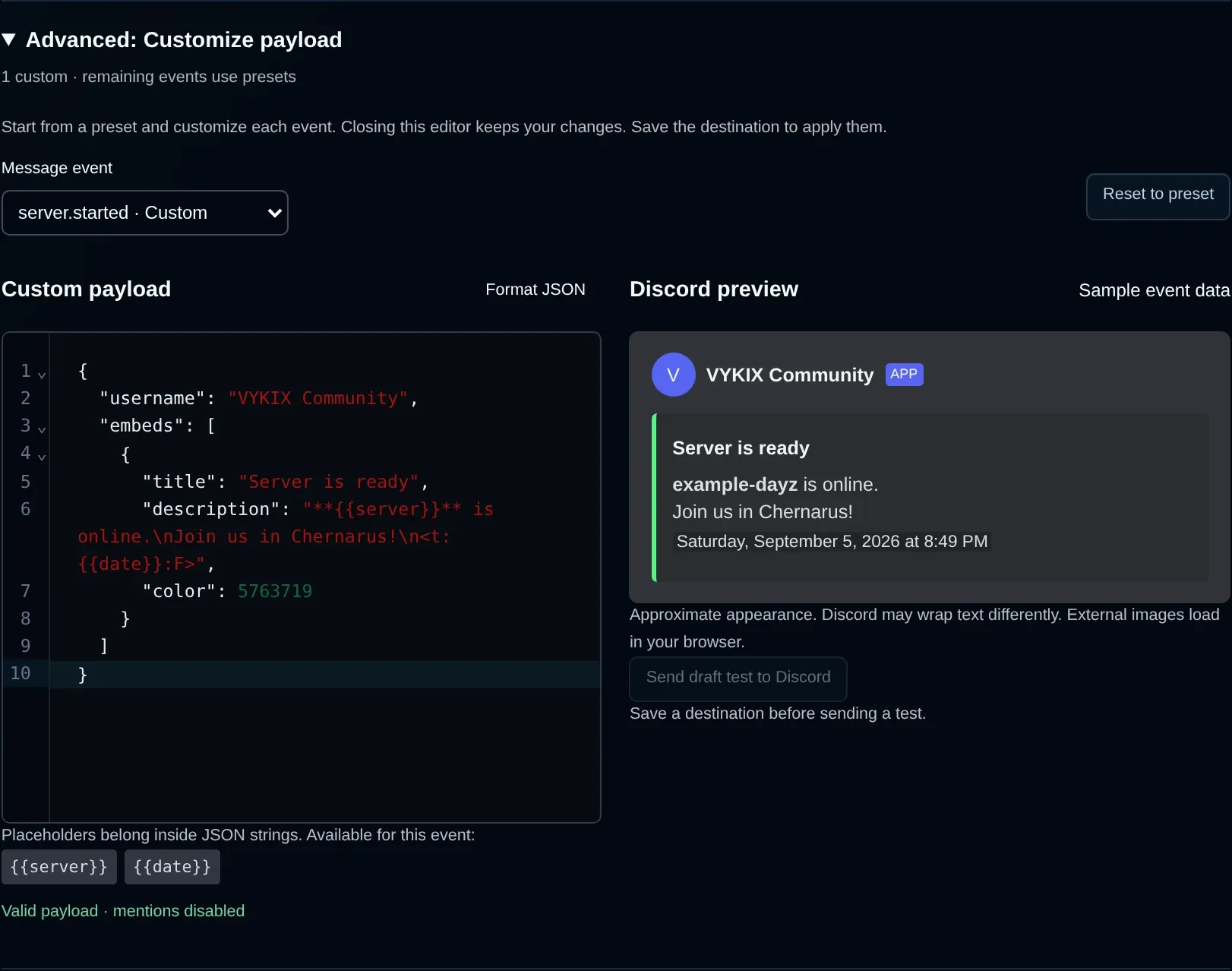
Sample event data renders this custom Server started draft. Preview generation sends no message. Save a destination before using its draft-test button.
Preview versus test
Section titled “Preview versus test”| Control | Effect |
|---|---|
| Discord preview | Validates and renders the draft with sample event data as you edit. It saves and sends nothing. The appearance is approximate, and your browser loads external images. |
| Send draft test to Discord | Sends the event draft with sample data to the saved URL. It neither saves the draft nor uses an unsaved replacement URL or runs a server lifecycle action. Save the destination first. |
| Test | Sends the standard connection-test message to the saved URL, rather than testing a custom event draft. |
Either test button sends a real Discord message. Choose an appropriate channel and avoid repeat tests. After saving, check delivery from an actual lifecycle event too, even if the preview or test worked.
Event placeholders
Section titled “Event placeholders”Use placeholders within JSON string values. The editor shows which ones the chosen event supports.
| Event | Available placeholders |
|---|---|
server.started |
{{server}}, {{date}} |
server.stopped |
{{server}}, {{date}}, {{reason}} |
server.updated_title |
{{server}}, {{date}}, {{title}} |
server.updated_mod |
{{server}}, {{date}}, {{mod}}, {{mod_id}} |
{{server}} contains the identifier, which can differ from the displayed server name. {{date}} contains a Unix timestamp in seconds. In message text, render it with Discord timestamp syntax such as <t:{{date}}:F>.
For Server started, a supported payload is:
{ "content": "**{{server}}** is online. Started at <t:{{date}}:F>."}Unknown placeholders and placeholders belonging to another event are rejected. {{mod}}, for example, works for Mod updated but not Server started. Real names and values can exceed the sample lengths, so leave room within message limits.
Supported JSON and limits
Section titled “Supported JSON and limits”Supported top-level keys are content, username, avatar_url, embeds and allowed_mentions. An embed may use title, description, url, color, fields, footer, author, image, thumbnail and timestamp.
- Use static HTTPS presentation URLs without embedded credentials, including for images and avatars. Placeholders are not permitted in URLs.
- Files, components, polls, TTS, unrecognized properties and repeated JSON keys are not accepted.
- The payload limit is 32,768 characters with a maximum JSON nesting depth of 16 levels.
- Content has a 2,000-character limit. You can include up to 10 embeds, each containing up to 25 fields, a 256-character title and a 4,096-character description. Total embed text cannot exceed 6,000 characters.
- Mentions remain disabled, including explicit user and role allowlists. Custom payloads cannot activate
@everyone,@hereor user/role notifications.
Validation names the failing property or gives a line and byte-column for malformed JSON. Fix the error and wait for a valid preview before saving or testing. Format JSON alone neither validates the message nor saves it.
Check status and delivery history
Section titled “Check status and delivery history”| Status | Meaning and next step |
|---|---|
provisioning |
Settings are saved while notification setup runs. Wait for it to finish. |
active |
Selected events are configured. Send a test to verify channel access. |
disabling |
Delivery registrations are being removed. Wait for completion. |
disabled |
Configuration remains saved, with lifecycle delivery turned off. |
error |
A change did not finish synchronizing. Read the error, resolve the connection or configuration issue and save again. |
revocation_error |
Removing access did not stop every notification registration. Ask support for help. |
On a saved destination, open Architect deliveries, press Load today and expand an event group to read sanitized delivery records. Retention is seven days, but the button fetches today’s records only. Connection and draft tests travel through another delivery path and do not appear as lifecycle records.
Troubleshooting
Section titled “Troubleshooting”| Problem | Check |
|---|---|
| New is disabled | A save may be running, or the server may have five destinations. Edit one or remove an unneeded destination. |
| Connect channel is disabled | Supply a name, a webhook URL and at least one event. |
| URL is rejected | Copy the Discord webhook URL again. Custom ports, non-Discord hosts, URL credentials, fragments and unsupported query parameters are not allowed. |
| Preview does not appear | Inspect the validation error for JSON syntax, property limits or unsupported event placeholders. |
| Draft test goes to the old channel | Draft tests target the saved URL. Save your replacement before testing. |
| Test succeeds but lifecycle messages are missing | Save edits, check active state and delivery/event selections, then use Load today after the relevant event. |
| Save reports a synchronization error | Settings may be saved despite failed delivery setup. Fix the reported problem and retry Save changes before adding another destination. |
| Discord rejects delivery | Confirm the webhook exists in the intended channel. Replace the URL if required, wait for any temporary rate limit to end and retry once. |
If the problem continues, ask VYKIX on Discord. Include the destination name, event, approximate time and sanitized error, keeping the full webhook URL private.